
Building maintenance software and equipment log for residential buildings
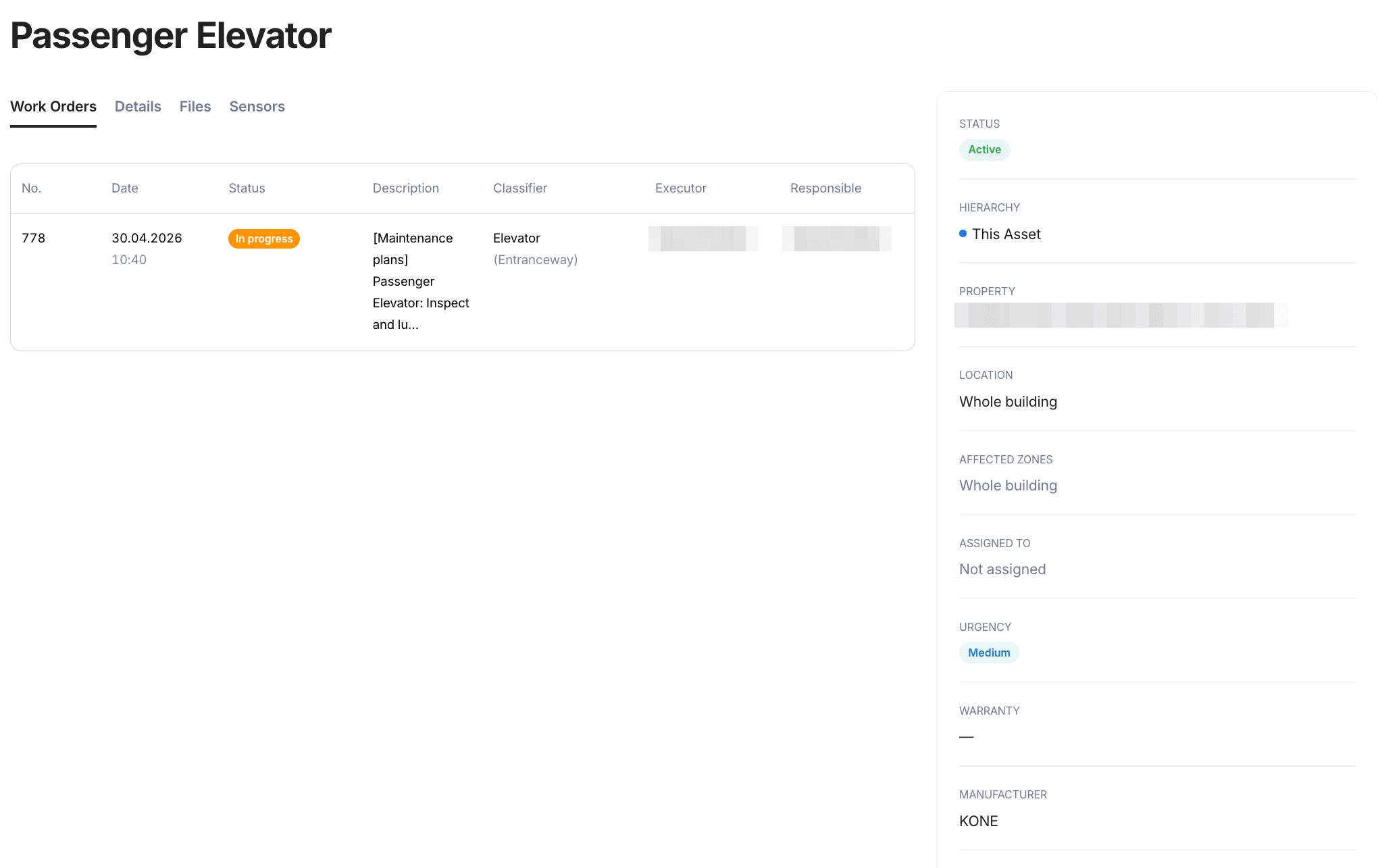
Unitify is building maintenance software for residential buildings. Every elevator, door, pump, electrical panel and roof gets its own card with the history of all work done on it — the equipment maintenance log your team and contractors work from. When a contractor leaves, the data stays in your system, not in their head.
Think of a building as a construction set: elevators, doors, pumps, panels, a roof. Each part is a card. Cards nest (pump station, pump, valve) and attach to the whole building, an entrance, a floor or a unit. No engineer keeps all of it in their head, so AI Engineer reads the manuals you attach to the card and drafts maintenance tasks with intervals, using the usual norms for your country. A person approves them. Each task then shows its next due date and sends a reminder, and one click turns it into a work order for the calendar.
People search for this under other names, such as property management maintenance software in the US or planned preventive maintenance (PPM) in the UK. The equipment maintenance schedule works the same way: one card per part, one approved plan, one history.
What it does
One card per part of the building
Elevators, doors, pumps, electrical panels, a roof or a facade: a card can have any name. Cards nest (pump station, pump, valve) and attach to the whole building, an entrance, a floor or a unit.
The history stays with the building
Files, work orders, warranty and the responsible person sit on the card, with its status. A new contractor sees what was done and when, instead of starting from zero.
AI-drafted maintenance plans
AI Engineer reads the manuals you attach to the card, plus the card’s name, manufacturer, model and system, and drafts maintenance tasks with intervals, using the usual norms for your company’s country. Each task says what to check, how often, and what to watch for with the contractor. The more exact the card, the closer the draft. It is a draft: check it against the manual and local rules.
From approved plan to work order
A person approves the plan. Each approved task then has a next due date and a reminder before it, and one click turns it into a work order, which you assign and place in the calendar.
Affected zones
Mark which entrances, floors and unit types an item affects, so a repair or a plan is tied to the right part of the building.
Printed labels for every unit
Generate a printed, laminated label for each piece of equipment, so a technician on-site reads every unit the same way.
Open the label generator
How it works
Add the parts
Import a PDF or spreadsheet list of your equipment, or create cards one by one. Manuals, warranties and other files can be stored on each card, and AI Engineer reads the manuals you attach. Nest cards the way the building is built, with parts inside parts.
AI Engineer drafts the plan
AI Engineer reads the manuals you attach to the card, plus the card’s name, manufacturer, model and system, and drafts maintenance tasks with intervals, using the usual norms for your company’s country. It is a draft: check it against the manual and local rules.
A person approves, due dates and reminders follow
Once a person approves the plan, each task has a next due date and a reminder before it. One click makes a work order, which you assign and place in the calendar.
Equipment register and AI Engineer are available on Base and Pro. AI usage past the included limit is billed per token — see pricing for the details.
See full pricingWhat it does not do
- The equipment log is not a certified statutory building record. A Bauwerksbuch (building logbook) in Vienna, or the carnet d’entretien of a condominium in Québec, is prepared by qualified professionals; Unitify keeps the working data and documents in one place, does not prepare either, and does not replace inspections carried out by licensed bodies.
- AI Engineer’s maintenance plans are drafts. A person reviews and approves each one before any task from it is used.
- There's no live link into building automation (BMS/SCADA) unless a Smart Building device integration is already in place. See Smart Building
See it in the walkthrough
Frequently asked questions
What is building maintenance software?
It keeps every part of a building on its own card with the history of all work done on it, and gives each card a preventive maintenance schedule. In Unitify, AI Engineer drafts that schedule from the card’s details and a person approves it.
What goes into an equipment maintenance log?
Each card holds its files, work orders, maintenance plan, warranty and the responsible person, and says which entrances, floors and unit types the item affects. The log is the sum of those cards, so it stays with the building when a contractor or an employee changes.
How is the equipment maintenance schedule built?
AI Engineer reads the manuals you attach to the card, plus the card’s name, manufacturer, model and system, and drafts maintenance tasks with intervals, using the usual norms for your company’s country. It is a draft: check it against the manual and local rules. A person always reviews and approves it. Each approved task then has a next due date and a reminder before it, and one click makes a work order.
Can I add a roof or a facade, not only machines?
Yes. A card can have any name, so structural parts such as a roof or a facade can be added next to elevators, pumps and panels, and cards can sit inside other cards.
Does the equipment log replace a statutory record like a Bauwerksbuch or a carnet d’entretien?
No. In Vienna a Bauwerksbuch, and in Québec a carnet d’entretien, is prepared by qualified professionals; in France the syndic keeps the carnet. Unitify keeps the working data and documents in one place and does not prepare them, and it does not replace inspections by licensed bodies.
Can I bring in my existing equipment list and documentation?
Yes — a PDF or spreadsheet list of equipment can be imported and becomes a list of cards. Manuals, warranties and project documentation can be stored as files on each card.
Can I print labels for the equipment in the register?
Yes — the free label generator produces a printed, laminated card for each unit with its system, type, location and contact.
Related reading
- AI for Chief Engineers — and Why Digital Building Compliance Is Becoming Mandatory
- What's New in Unitify: Smarter Tools for Property Managers
- From Chessboard to Cockpit: One Screen to Run the Entire Building